Background
The World of Warcraft “WeakAuras” addon, lets you dynamically make little icons on appear on your screen during gameplay, to remind you of things.
Each such icon is called a “WeakAura”. For example, here are some on my screen right now:
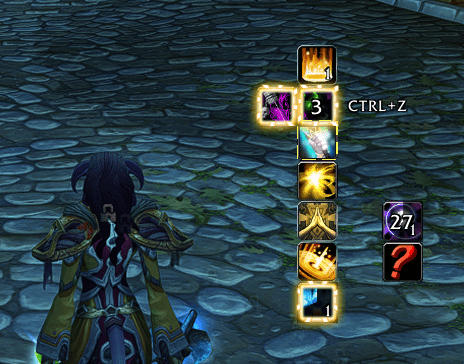
If you try to make one yourself, you might be overwhelmed and confused, your first time. That’s because, it’s a super versatile addon, that can do some really specific stuff!
But, you probably just want to make a few simple WeakAuras. Nothing crazy. Right?
Good news: if you know what you’re doing, most WeakAuras you want to make, can be made in about 20 seconds each.
I couldn’t find a guide that quickly explained how to make simple WeakAuras. They always go into way too much detail into aspects I’m not gonna need.
So I decided to make one!
TL;DR/Summary
Here’s the extremely short version of what we’re going to do, then we’ll go through a real example.
Most WeakAuras you’ll want to make, you will just do these steps:
- Create a new “ICON” WeakAura, and give it a name.
- Tweak the “Triggers” tab. You probably only need 1 trigger, so just modify the trigger that’s already there.
- Tweak the “Load” tab. You probably want “In Combat”, with a certain “Spell Known”.
- Tweak the “Display” tab. You probably want to make the icon a little smaller.
- Drag the icon around on your screen (it’s probably underneath the addon window).
That’s it!
Full Real Example: Reminding Myself to Cast “Mindbender” Spell
This is gonna be a full realistic situation, where I want to create a WeakAura. I’ll explain the situation, and exactly how to create and configure the WeakAura.
Look at this priest spell, “Mindbender“, in Mists of Pandaria Classic. Here’s the tooltip:
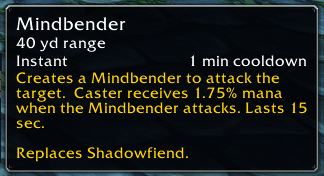
It has a 1 minute cooldown, and every time I use it, I get a bunch of mana back.
In other words, I should probably cast this every time it is NOT on cooldown! The longer I forget to cast it, the more mana I’m missing out on! As a healer, every second spent that I forget, could be the difference between a boss kill, versus going OOM and causing a wipe.
So, I want to make a “WeakAura”, that shows an ICON on my screen, whenever the spell is NOT on cooldown, to remind me to cast the spell, right away!
First, I open my WeakAuras screen by typing /wa
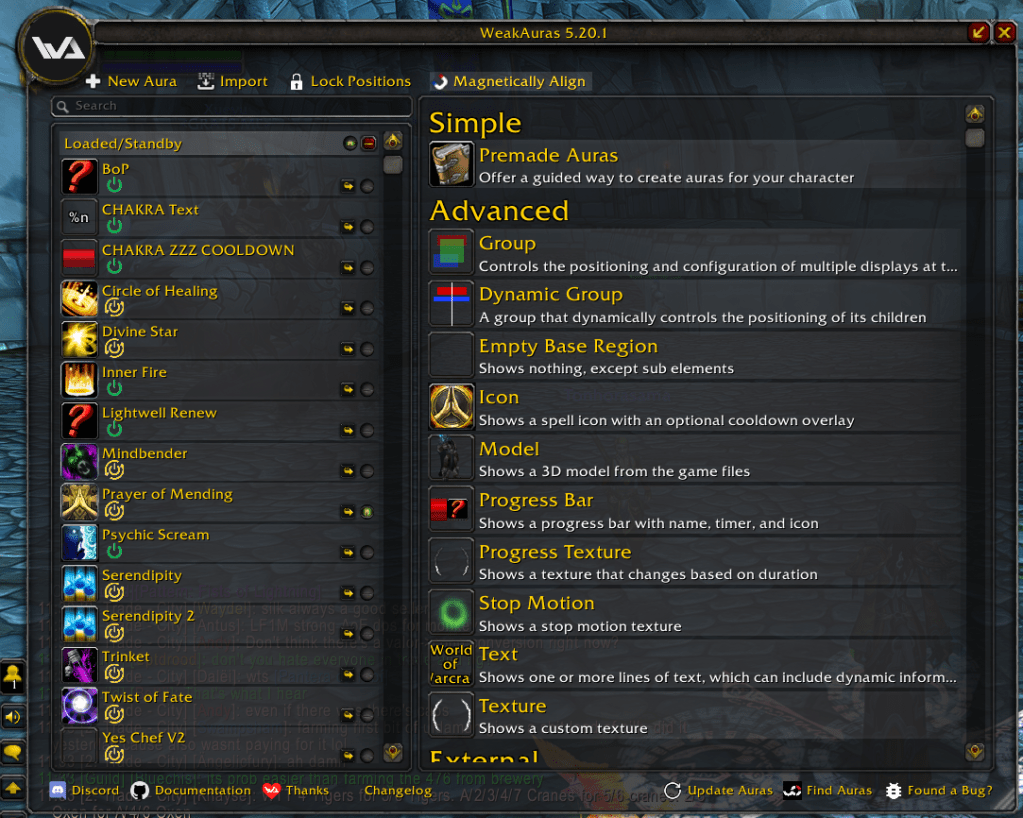
On the left is all my existing WeakAuras I’ve created, or imported from elsewhere. If you don’t have any yet, the left side of your window might be empty.
On the right is all the ways to create a new WeakAura.
(If you don’t see the same thing as me on the right, then click “+ New Aura” at the top left corner of the screen.)
First we’re going to create the WeakAura. Then we’re going to keep configuring it until we like it.
To create the WeakAura, let’s choose “Icon” from the list, because “Icon” WeakAuras are the best:

(Don’t do the “Premade Auras” thing, it’s confusing.)
After clicking “Icon”, the new WeakAura will immediately appear in the list on the left side of the screen (see the picture below), and there’s a cursor there, because it wants me to start typing the WeakAura name.
Let’s just type in “Mindbender”, and press enter:
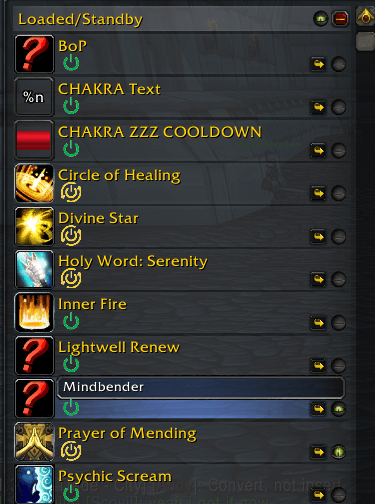
Now the WeakAura exists, in a dumb default useless state, with no rules in it. My screen looks like this:
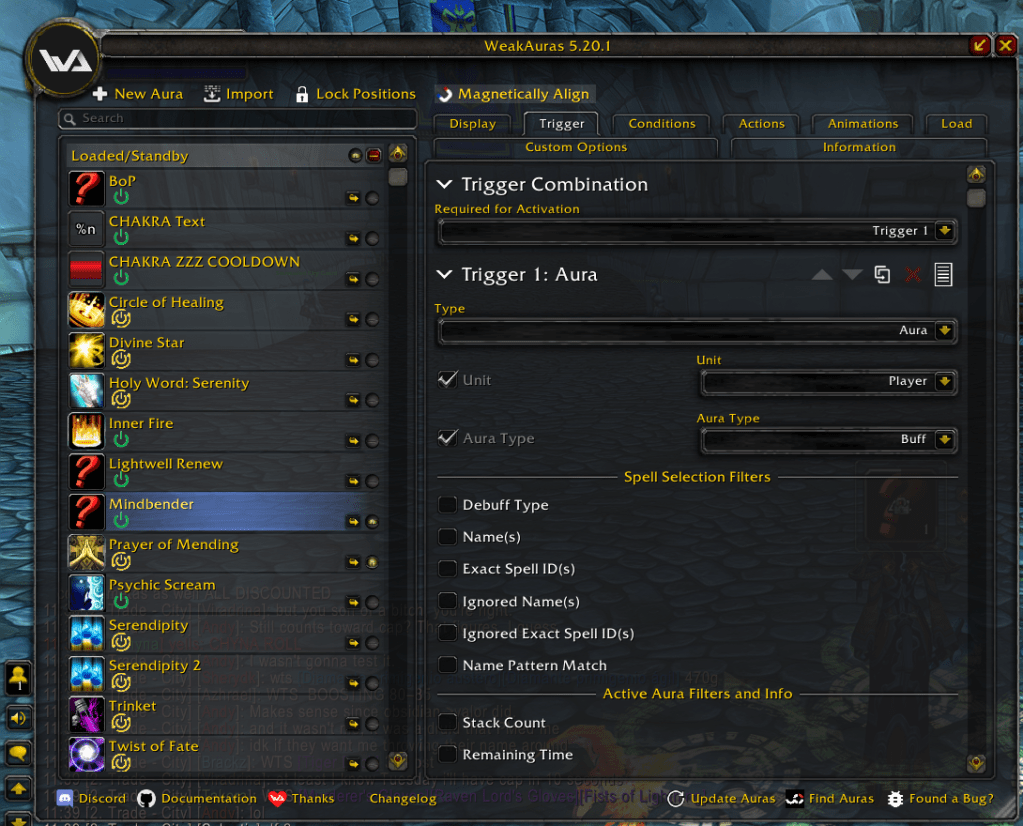
You can keep coming back and modifying any WeakAura, forever. All you have to do is click on it, so that it’s highlighted, like I have done in the above picture.
At this point, it’s actually already a Question Mark icon on my real screen! It’s UNDERNEATH my WeakAuras addon window!
I move the addon window to the side, to see it:
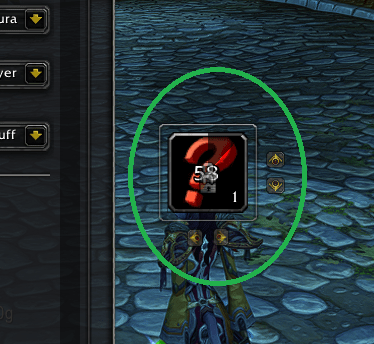
There it is. I’m gonna drag this WeakAura somewhere to the right side of the screen for now. I’ll fine-tune the position later.
OK, now I go back to the WeakAura addon, and I make sure my new “Mindbender” weakaura is highlighted (so I can start configuring it!).
OK now let’s look at all these tabs for configuring this WeakAura, at the top of the screen:

“Trigger” is the most important one, we’re gonna start there.
You’re probably never going to use “Conditions“, “Actions“, “Animations“, “Custom Options“, and “Information” tabs. Just forget those exist, forever. (The “Load” and “Display” tabs are good, we’ll need those later!!)
(Note: This is probably where most people get stuck, not realizing that “Trigger” is the good tab, and all the others are bad.)
Here’s the “Trigger” tab right now:

There is one trigger right now, called “Trigger 1: Aura“. That’s good, I only need 1 trigger for this. It’s possible to scroll down and add another, but I don’t want to, in my case.
It says “Trigger 1: Aura“. That means it is in Aura mode right now. Aura is another word for buffs. That’s wrong, I don’t want it to look at Auras (buffs). I want it to look at my spell.
So I’m gonna change the trigger’s “Type” to “Spell“, like this:

Now the trigger looks different! Check it out:

It says “Trigger 1: Cooldown/Charges/Count” and all the options changed.
“Cooldown/Charges/Count” is a subtype of “Spell“. It automatically selected that subtype by default (you can see it in the dropdown to the right of “Spell”).
I actually DO want this WeakAura to look at the cooldown of the spell! So I don’t need to change the subtype! “Cooldown/Charges/Count” is correct.
I want it to look at my “Mindbender” spell specifically. So I type that in here and press “Okay”:
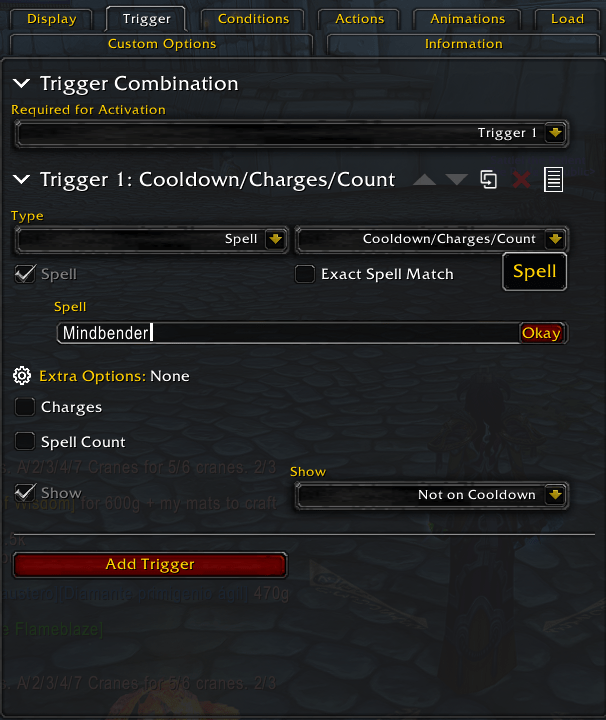
After I press enter, it automatically puts the icon there, and the Spell ID. That proves to me, that I typed the spell name right:

If that didn’t happen, I might have the spelled the spell’s name wrong. Ironic!
Next, I would like the WeakAura icon to appear on my screen when the spell is NOT on cooldown, because seeing the icon, will remind me to cast the spell!
So I make sure this says “Not on Cooldown” in this dropdown:
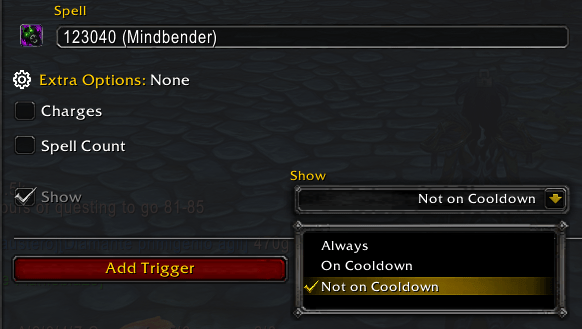
OK, my WeakAura works now!
But we have a problem.
I only want this WeakAura icon to show up while I’m in combat! Otherwise it’s always on my screen all day long!
Also, sometimes I switch my talents, and I don’t even HAVE this spell anymore! I don’t want to be reminded to cast a spell I don’t currently have equipped!
To fix both of these things, let’s go to the “Load” tab:
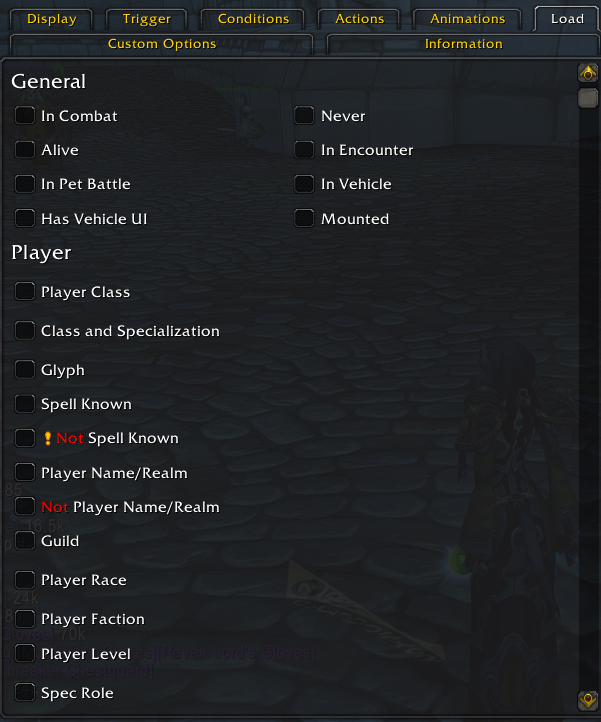
All we have to do is check the box for “In Combat” at the top, and check the box for “Spell Known” below, and type in “Mindbender”:
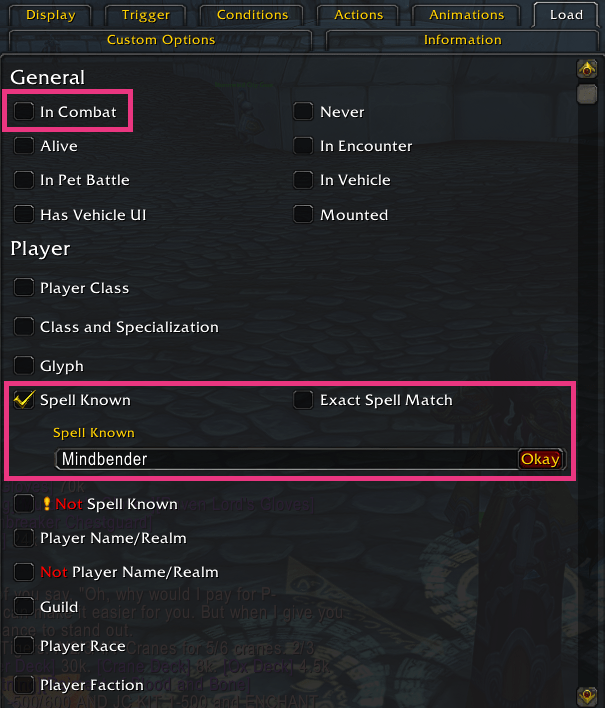
By the way, here’s a nice aspect of the “Load” tab: if the WeakAura is unloaded, due to how we’ve configured the “Load” tab, then the game gets to completely ignore the WeakAura, which means the game runs better! This isn’t true for the things we did in the “Trigger” tab, the game constantly has to check those things.
In other words, try to use the “Load” tab, to keep WeakAuras NOT loaded, as much as possible, to keep your game running well, as much as possible!
Anyway, that’s it, now this “Mindbender” WeakAura works! But definitely keep reading the next section, it’s important.
Tweaking the Visuals of the Icon
The addon is smart enough to pick the correct picture for the icon, because we told it a spell, and it just uses the icon from the spell itself.
BUT there’s other things I want to tweak, for example, the icon is too big on my screen!!
Let’s go to the Display tab:
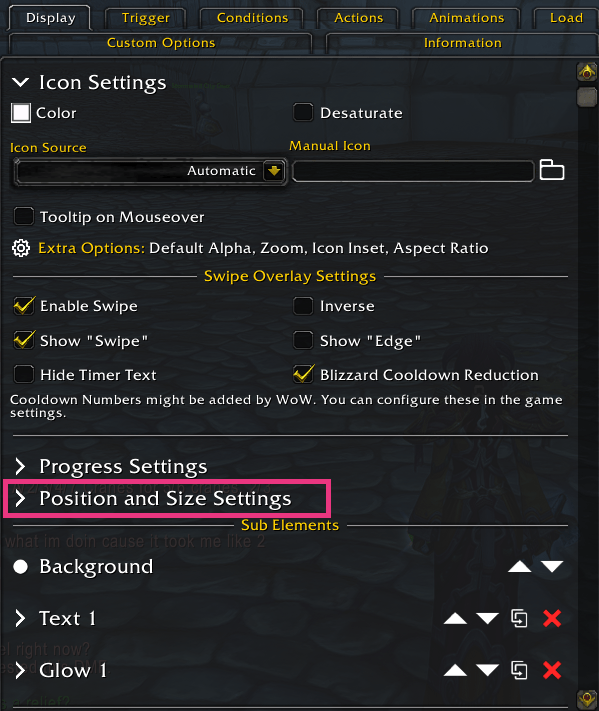
“Position and Size Settings” is the thing I want. Notice it says “>” instead of “v“, so therefore it isn’t expanded to show these settings right now.
So I click on that, and it expands to show those settings:

I really just want to change the Width and Height, so I type “32” into these rectangles (originally it said 64, too big for me!)

I could mess with the other settings below that, to move the WeakAura icon around on my screen…
…but it’s easier to just drag the WeakAura icon around on my screen instead. As long as the WeakAura is highlighted in the addon window, I can drag the real icon around on my screen!
This “Mindbender” spell, it’s actually pretty crucial that I cast it immediately, so I might even check this box here to make the icon glow!

OK, now we’re really actually done!
But keep reading just a little bit more, because we could improve this “Mindbender” WeakAura a little bit more!
Advanced Triggering: TWO TRIGGERS
Turns out, I don’t actually want to cast “Mindbender” when I’m already at full mana!!! It would be a waste!
So my plan is to make the icon only show when: the spell is not on cooldown, AND my mana is below 85%! This will be TWO different triggers, and the icon should show up only when BOTH are met!
So let’s return to the “Triggers” tab, and we’re going to hit “Add Trigger” at the bottom:

Here’s the 2nd Trigger that shows up:
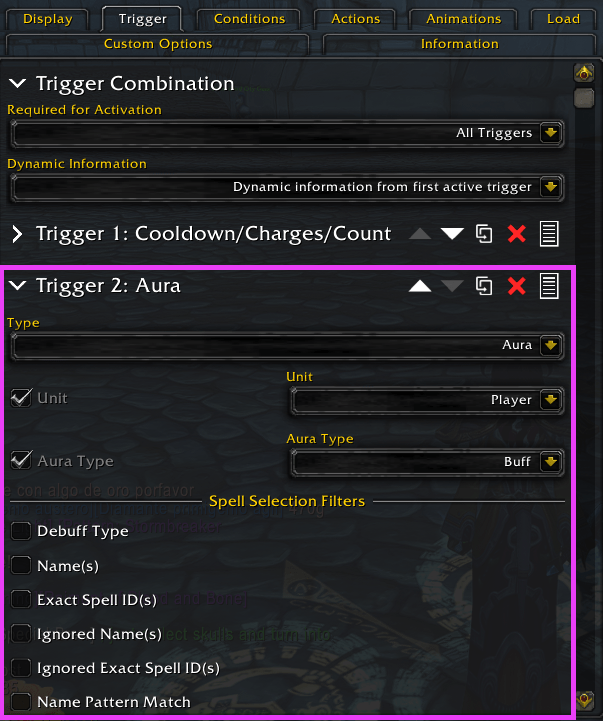
But we don’t want it to look at an “Aura” (buff), we want it to look at ME, the PLAYER.
So I select “Player/Unit Info” from the Type dropdown:
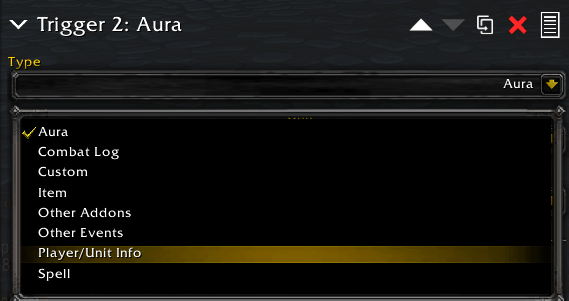
Now it says “Trigger 2: Health” but that’s wrong, I actually want it to look at my Mana.
So I select “Power” from the subtype dropdown:
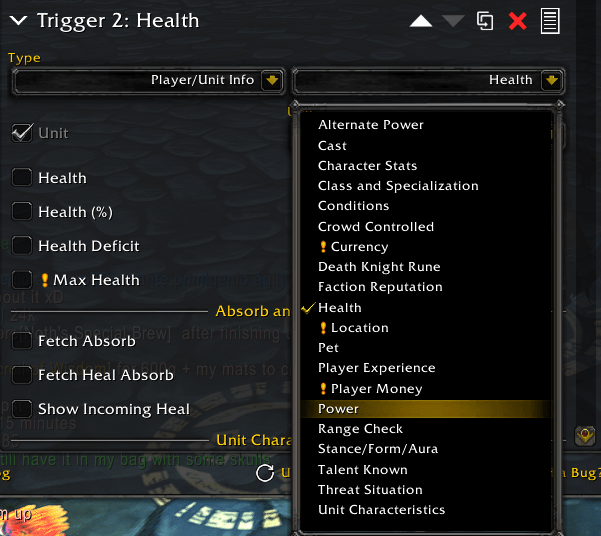
They say “Power” as a generic term, instead of Mana, since some characters use Energy or Rage instead. It’s all just “Power” from this addon’s point of view.
OK now I wanna make sure it’s looking at ME (not somebody else) and looking at the percent of my mana, so make sure this dropdown says “Player” (that’s me) and then check the box for “Power (%)“:

After I check the “Power (%)” box, it shows me more options to the right (see below picture).
I want it to only show the icon when my mana is below 85%, so I made it look like below:

OK, now scroll back to the top of the “Triggers” tab!
I actually want this icon to appear only when BOTH triggers are being met, together!! In other words I want it to show when the spell is off cooldown AND I’m missing mana! (Don’t remind me to cast it, if only one of those is true.)
So I select “All Triggers” here. That means BOTH are required for this icon to show up.

On the other hand, if I wanted the icon to appear when AT LEAST ONE of the triggers had been “met”, then I would instead select “Any Triggers” in that dropdown.
(What’s an example of when I would want that? Well sometimes I want to be reminded to cast a spell, if it is either Not on Cooldown, OR, if it has <1 second left of its cooldown! So I can start queueing it up as my next spell. As an experiment, you might want to try to make a weakaura like that!)
Moving Many WeakAuras Around
I often want to see all my WeakAuras and tweak their positions.
To do this, I click all these little eyeball icons, on the left, and make them all look like green eyeballs:
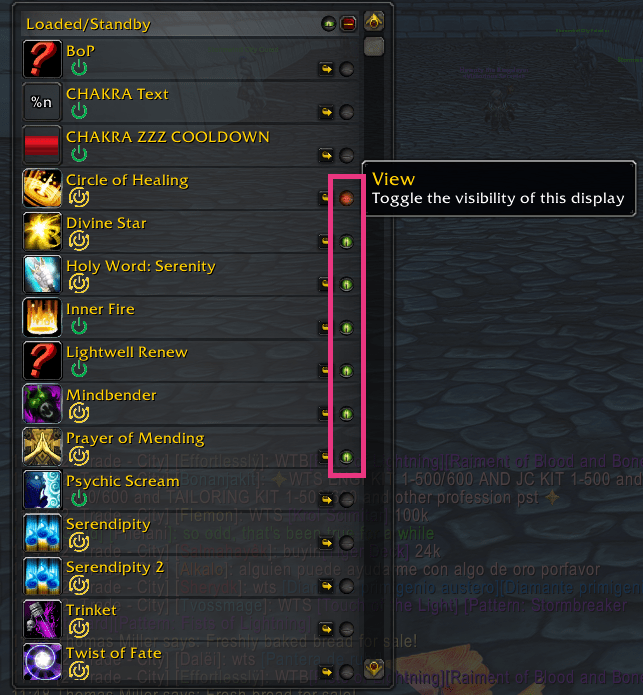
This makes the icons visible on the screen, like this:

Now I can drag them around.
Sometimes the dragging doesn’t work. To fix that problem, I select that particular WeakAura from the left side of the “WeakAuras” window, so that it is highlighted. Once it is highlighted in the menu, I can drag the icon itself.
Quickly Making More WeakAuras Like This One
Suppose I have other spells, like “Mindbender”, that I want to be reminded of, whenever they’re NOT on cooldown.
Do I need to do all the above steps again?
No!
I can simply right-click the “Mindbender” WeakAura in the list of WeakAuras, and select “Duplicate” from the context menu:
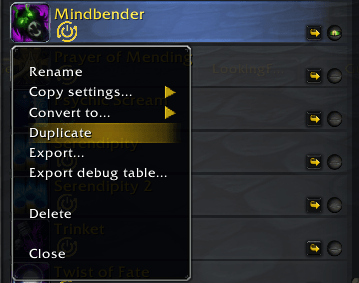
This creates another WeakAura, and it wants me to start typing the name of it:
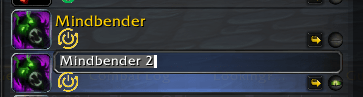
I’ll just put the name of the other spell (let’s say, “Hymn of Hope“).
Then I just need to reconfigure the new WeakAura, by highlighting it, and then reviewing the “Triggers” tab, and the “Load” tab, replacing each instance of “Mindbender” with “Hymn of Hope”.
And I also probably need to move the new WeakAura’s icon, so it’s not in the same spot!

 Epyo's Articles About Fun Stuff